In the last article i informed u about running ps2 games on computer and in this post i will show u the best method of running games which require graphics without it........
Here we begin.......
1) Download The Software 3d analyzer From this Link....
http://www.tommti-systems.de/main-Dateien/TOOLS/dontlinkthefile_3danalyzer-v236.exe
2) Install the softwarein your computer and after installing run it...........
3) You will See an image like this
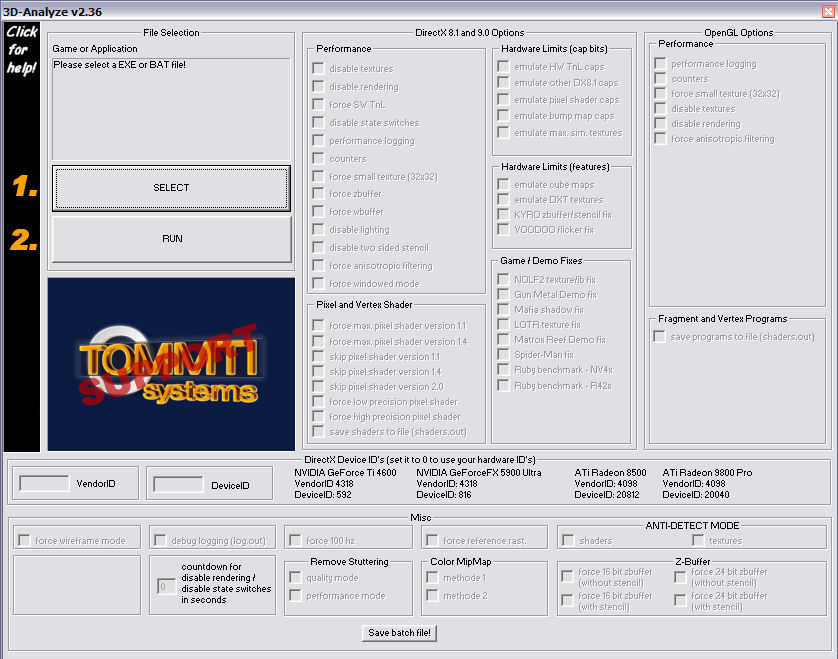
3) On the Left Side you can see It is written "Click for help"...Just click on it and if u want u can read in detail about its different functions......
4) First click on "Select" button and select the executable file of the game....For eg. if you want to run NFS Carbon then go to its main folder and select "NFSC.exe".
5) Remember you have to choose the file whose extension is .exe and its name is same as the game name...
6) OK now in the image You cagn see the Heading "Hardware Limits(cap bits)". Under this heading the first option is "emulate HWTnl" just tick mar on this option..........
7) Now click on run and if your game starts then you are very lucky enjoy the game.... And if the game dosen't start or gives an error then unfortunately u cant play the game....
8) Once you close 3d analyzer then for running the game u need to follow the same intructions....
9) For running games through this software you need to have 1gb ram.....But dont worry i am using this software in only 512mb of Ram................Just Enjoy........
Here we begin.......
1) Download The Software 3d analyzer From this Link....
http://www.tommti-systems.de/main-Dateien/TOOLS/dontlinkthefile_3danalyzer-v236.exe
2) Install the softwarein your computer and after installing run it...........
3) You will See an image like this
3) On the Left Side you can see It is written "Click for help"...Just click on it and if u want u can read in detail about its different functions......
4) First click on "Select" button and select the executable file of the game....For eg. if you want to run NFS Carbon then go to its main folder and select "NFSC.exe".
5) Remember you have to choose the file whose extension is .exe and its name is same as the game name...
6) OK now in the image You cagn see the Heading "Hardware Limits(cap bits)". Under this heading the first option is "emulate HWTnl" just tick mar on this option..........
7) Now click on run and if your game starts then you are very lucky enjoy the game.... And if the game dosen't start or gives an error then unfortunately u cant play the game....
8) Once you close 3d analyzer then for running the game u need to follow the same intructions....
9) For running games through this software you need to have 1gb ram.....But dont worry i am using this software in only 512mb of Ram................Just Enjoy........


No comments:
Post a Comment